

MDT Compatibility
| Status | Description |
|---|---|
| Built-In (script) | Fully integrated into the script and auto-detected, no modifications or configuration needed. |
| Built-In (creator) | Fully integrated by the resource creator, no modifications required. |
| Built-In (cd_bridge) | Fully integrated through cd_bridge and auto-detected, no extra changes needed in the supported resource. |
| Minor Changes Required | Small, simple edits such as adding or copying a single line of code. |
| Moderate Changes Required | Involves replacing existing logic or functions with the versions provided by Codesign. |
| Major Changes Required | Extensive modifications across multiple files or large code sections. |
Supported MDT Compatibility
Supported MDT resources can display alerts from Dispatch3D.
| Script Name | Compatibility Type | Notes |
|---|---|---|
| codem-mdtv2 | Built-In (cd_dispatch3d) | |
| p_mdt | Built-In (creator) | |
| plt_mdt | Built-In (cd_dispatch3d) | |
| ps-mdt | Moderate Changes Required | #ps-mdt |
| tk_mdt | Built-In (creator) |
MDT Compatibility Guides
Step-by-step guides for making supported MDT resources display alerts from our dispatch system.
Notice
The exact line where these changes are made may differ after updates, but the code itself remains the same.
ps-mdt
View the code on GitHub: ps-mdt/server/main.lua
REPLACE the code exactly as seen in the screenshot below.
local dispatchResources = {
    { name = 'ps-dispatch', export = 'GetDispatchCalls' },
    { name = 'cd_dispatch3d', export = 'GetDispatchCalls_PS' },
    { name = 'cd_dispatch', export = 'GetDispatchCalls_PS' },
}
for _, res in ipairs(dispatchResources) do
    if GetResourceState(res.name) == 'started' then
        return exports[res.name][res.export]()
    end
end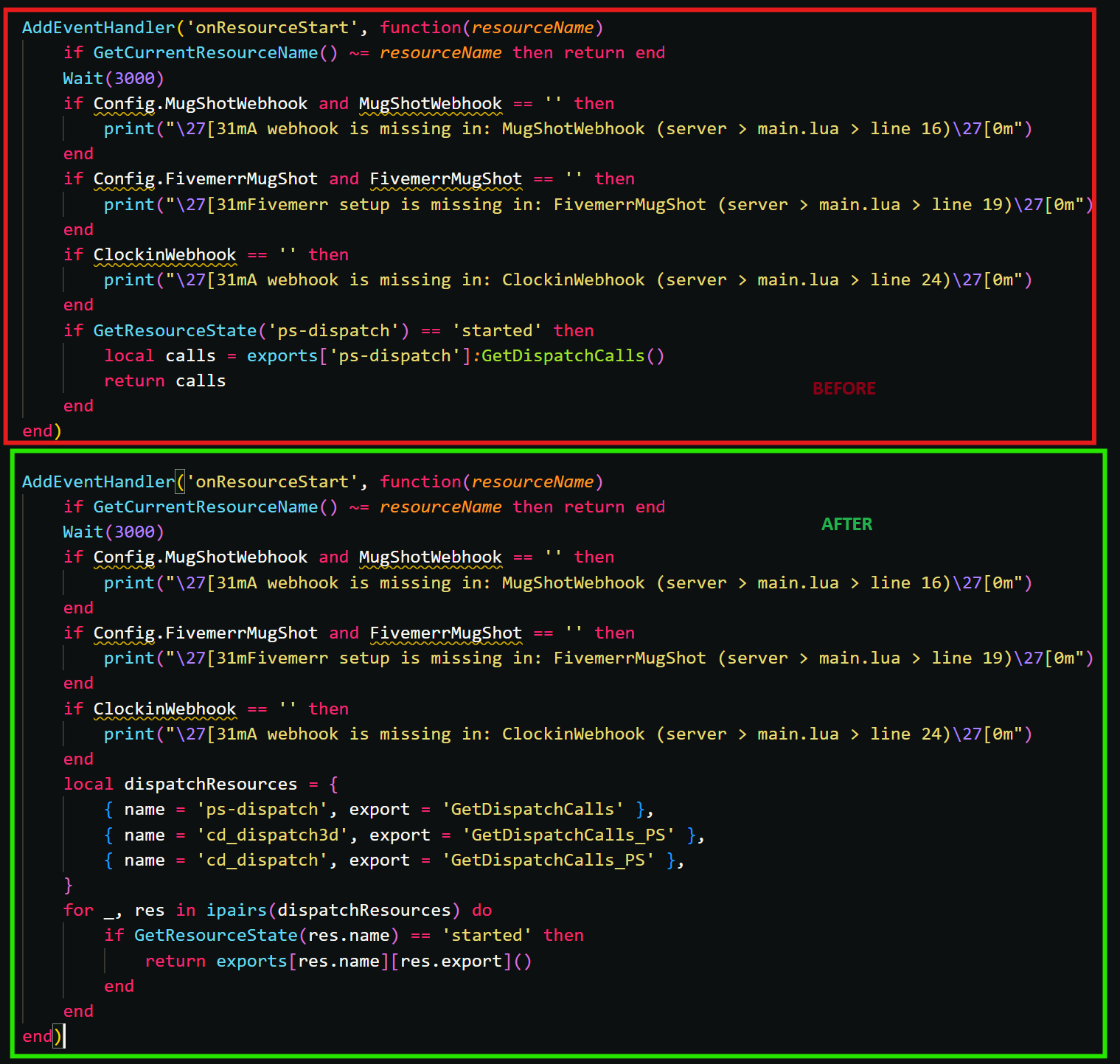 Before and After
View the code on GitHub: ps-mdt/server/main.lua
REPLACE the code exactly as seen in the screenshot below.
local dispatchResources = {
	{ name = 'ps-dispatch', export = 'GetDispatchCalls' },
	{ name = 'cd_dispatch3d', export = 'GetDispatchCalls_PS' },
	{ name = 'cd_dispatch', export = 'GetDispatchCalls_PS' },
}
for _, res in ipairs(dispatchResources) do
	if GetResourceState(res.name) == 'started' then
		calls = exports[res.name][res.export]()
		break
	end
end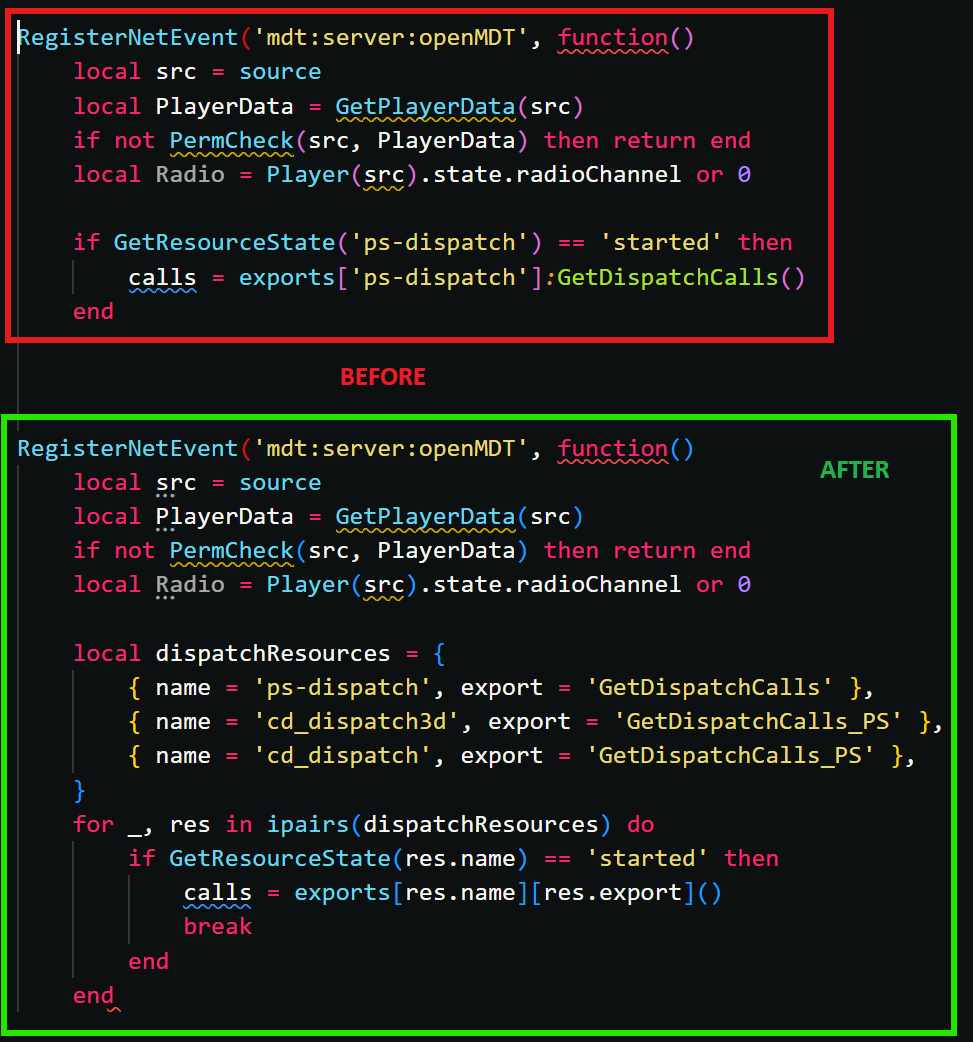
Before and After
View the code on GitHub: ps-mdt/server/main.lua
REPLACE the code exactly as seen in the screenshot below.
local dispatchResources = {
	{ name = 'ps-dispatch', export = 'GetDispatchCalls' },
	{ name = 'cd_dispatch3d', export = 'GetDispatchCalls_PS' },
	{ name = 'cd_dispatch', export = 'GetDispatchCalls_PS' },
}
for _, res in ipairs(dispatchResources) do
	if GetResourceState(res.name) == 'started' then
		cb(exports[res.name][res.export]())
		break
	end
end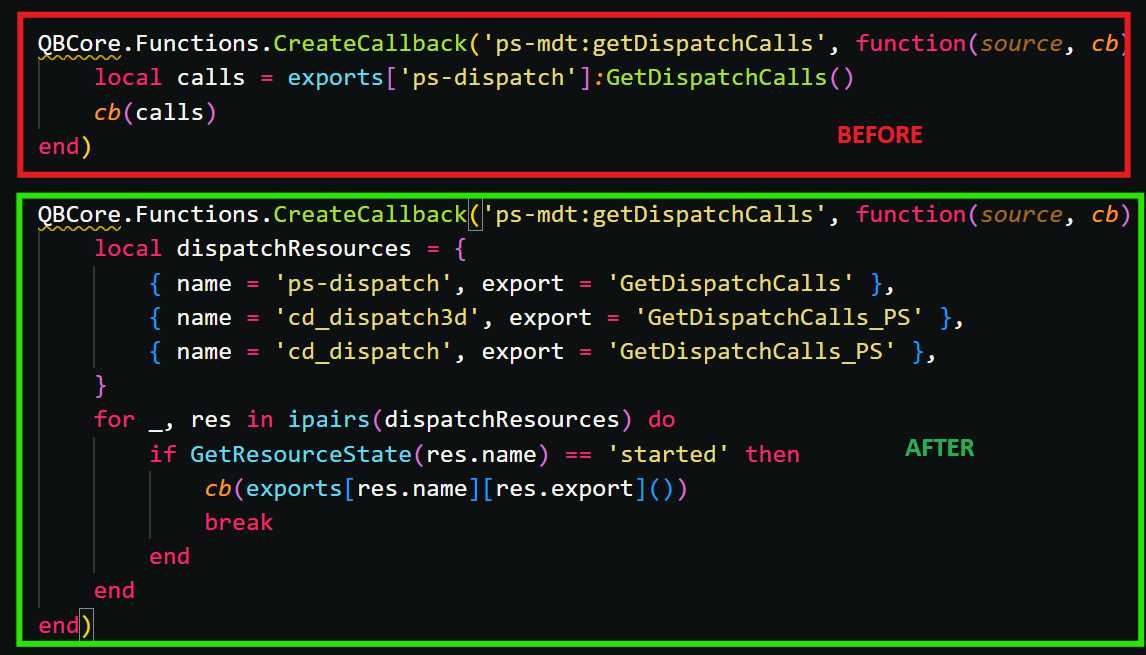 Before and After
View the code on GitHub: ps-mdt/client/main.lua
REPLACE the code exactly as seen in the screenshot below.
CreateThread(function()
    local dispatchResources = {
		{ name = 'ps-dispatch' },
		{ name = 'cd_dispatch3d' },
		{ name = 'cd_dispatch' },
	}
	for _, res in ipairs(dispatchResources) do
		if GetResourceState(res.name) == 'started' then
			TriggerServerEvent("ps-mdt:dispatchStatus", true)
			break
		end
	end
end)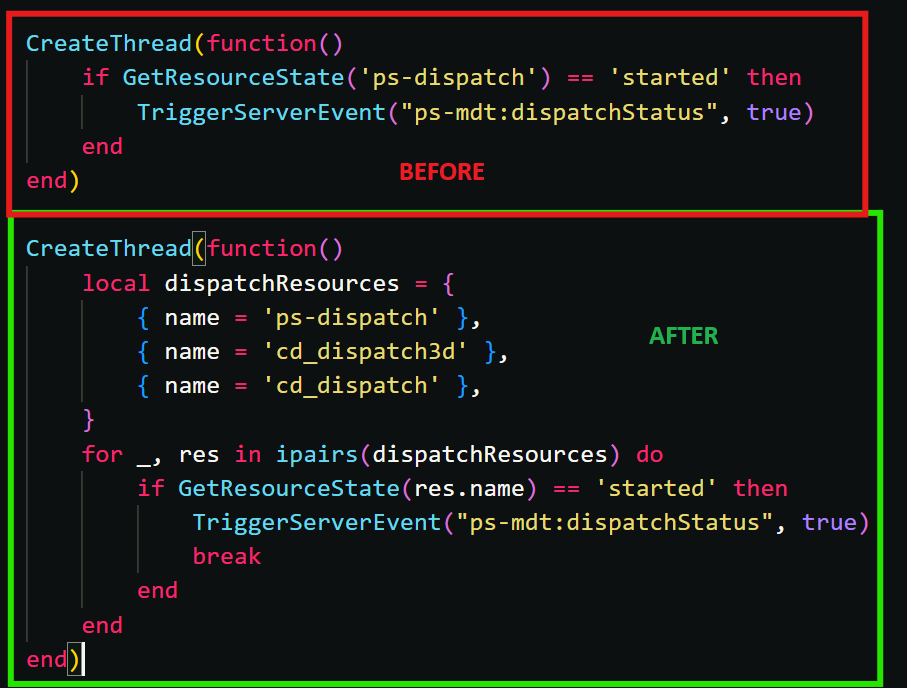 Before and After